The Arlo Pro 2 launched years ago as a wireless security camera game-changer, offering battery power, weatherproofing, and 1080p HD video without the hassle of running cables through walls. Fast-forward to 2026, and the security camera market has exploded with newer models boasting 2K resolution, built-in spotlights, and AI-powered detection. But does that make the Pro 2 obsolete? Not necessarily. For budget-conscious homeowners comfortable with slightly older tech, this camera still delivers solid fundamentals: reliable motion detection, two-way audio, and genuine wire-free installation that won’t require patching drywall or hiring an electrician. This guide evaluates whether the Arlo Pro 2 remains a practical choice for DIY home security or if it’s time to skip ahead.
Table of Contents
ToggleKey Takeaways
- The Arlo Pro 2 security camera remains a practical wire-free option for budget-conscious homeowners and renters, with rechargeable batteries eliminating the need for wall drilling or cable installation.
- While the 1080p HD video and 25-foot night vision are adequate for basic security monitoring, the resolution lags behind modern 2K alternatives for capturing fine details like distant license plates.
- Used Arlo Pro 2 units cost $80-120 per camera in 2026, roughly half the price of current-generation models, but require a mandatory $4.99/month subscription for cloud storage and smart notifications.
- The base station design extends wireless range beyond Wi-Fi cameras, making it ideal for large properties, though it requires an additional router outlet and ethernet connection.
- Installation is DIY-friendly and takes 30-45 minutes with magnetic mounts and a simple app-based pairing process, though mounting on vinyl siding requires locating solid backing for secure attachment.
- Battery life varies from 4-5 months in low-traffic areas to 6-10 weeks in high-traffic locations, with cold weather reducing performance by 30-50%, making the optional solar panel accessory valuable in certain climates.
What Makes the Arlo Pro 2 Stand Out?
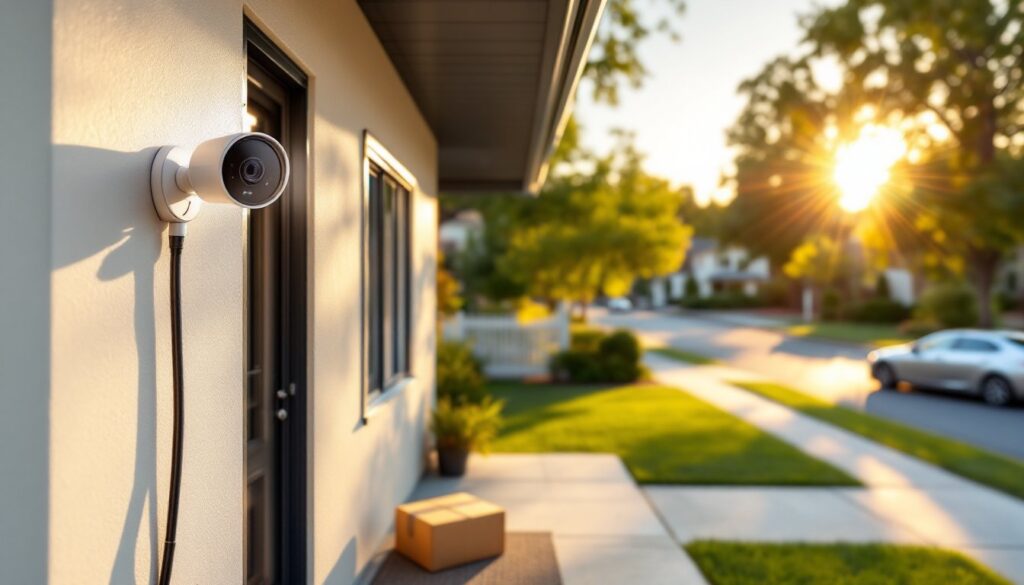
The Arlo Pro 2’s biggest selling point remains its 100% wire-free design. Unlike hardwired cameras that require drilling through exterior walls and fishing low-voltage cable, the Pro 2 runs on a rechargeable battery pack or optional solar panel. This makes it ideal for renters, homeowners in historic districts with drilling restrictions, or anyone installing cameras on detached garages and sheds where running power isn’t practical.
The camera uses a proprietary base station rather than connecting directly to Wi-Fi. This hub plugs into your router via Ethernet and communicates with cameras over a dedicated wireless frequency. The upside? Better range and battery life than pure Wi-Fi cameras. The downside? One more piece of hardware on your network and an extra outlet used.
Another standout feature: rechargeable batteries. Each camera uses a proprietary battery pack (CR123A cells in a custom housing) that slides into the back. Arlo rates battery life at 3-6 months depending on activity, but real-world performance varies widely. High-traffic areas with frequent motion triggers will drain batteries faster, expect 6-10 weeks in those scenarios. Charging requires removing the camera from its mount and plugging in a micro-USB cable, which takes about 3-4 hours.
The Pro 2 also supports continuous video recording (CVR) if you subscribe to Arlo’s premium plan and add an optional power adapter. This converts the battery-powered camera into a wired one, enabling 24/7 recording instead of motion-triggered clips. For monitoring blind spots or recording continuously during vacations, CVR can be valuable, but it defeats the wire-free advantage.
Key Features and Specifications
The Arlo Pro 2 records in 1080p Full HD at 30 frames per second. Resolution holds up reasonably well for identifying faces and license plates within 15-20 feet, though newer 2K and 4MP cameras offer noticeably sharper detail. The camera features a 130-degree field of view, which covers a standard doorway or driveway without fisheye distortion.
Night vision uses six infrared LEDs with an effective range of about 25 feet. Image quality in full darkness is serviceable, you’ll see outlines and movement clearly, but fine details like clothing color or distant license plates become harder to discern. The Pro 2 lacks the built-in spotlight found on newer models, so night-time color recording isn’t an option unless you add external lighting.
Two-way audio works through a built-in microphone and speaker. Audio quality is functional for brief exchanges (“Leave the package by the door”) but expect slight latency and occasional echo. Wind noise can be an issue outdoors, though Arlo’s app includes noise reduction settings that help.
The camera is rated IP65 weather-resistant, meaning it handles rain, snow, and dust without issue. Operating temperature range is -4°F to 113°F, though extreme cold reduces battery performance significantly. If you’re in a region with harsh winters, plan on more frequent recharging or switch to wired power during cold months.
Motion detection uses passive infrared (PIR) sensors with adjustable sensitivity and customizable activity zones. You can mask out areas like busy streets or swaying tree branches to reduce false alerts. Detection range is approximately 23 feet, and response time (from trigger to recording start) averages 3-5 seconds, acceptable but not as instant as hardwired systems.
Installation and Setup: A DIY-Friendly Experience
Installation takes about 30-45 minutes for a two-camera system, assuming you’ve already decided on placement. Start by setting up the base station: plug it into your router with the included Ethernet cable and connect the power adapter. The unit takes about 2 minutes to boot up, LEDs on the front indicate connectivity status.
Download the Arlo app (iOS or Android) and create an account. The app walks through pairing cameras to the base station via a simple sync button process: press the button on the base station, then press the sync button on the camera (located on the side or back). A blue LED blinks during pairing and turns solid when successful. The process is intuitive, though occasionally a camera requires two or three pairing attempts.
For camera mounting, Arlo includes magnetic mounts that attach to walls with two screws. Use a level to ensure the camera sits straight, crooked footage is surprisingly disorienting to review. Mark your screw holes with a pencil, drill pilot holes using a 3/32-inch bit for wood or 3/16-inch for masonry, then drive the included screws. The magnetic mount lets you adjust camera angle easily after installation.
If you’re mounting to brick, stucco, or vinyl siding, use masonry anchors appropriate for the substrate. For vinyl, locate a stud or sheathing behind the siding for solid attachment, the camera and mount weigh about 5 ounces, so direct-to-siding mounting may not hold long-term. Wear safety glasses when drilling masonry: a hammer drill makes the job much easier than a standard drill.
Avoid placing cameras where they’ll receive direct sunlight for extended periods, the dark housing absorbs heat, which stresses batteries. Also consider sight lines: position cameras 7-10 feet high to avoid tampering while keeping subjects within the optimal detection range. Understanding proper home security cameras installation principles helps maximize both coverage and camera lifespan.
Performance in Real-World Home Security Scenarios
In typical residential use, front porches, driveways, backyards, the Arlo Pro 2 performs reliably for motion-triggered recording. Motion alerts arrive on your phone within 5-10 seconds of an event, and video clips begin recording almost immediately after trigger. The adjustable activity zones work well to eliminate false alerts from cars passing on the street or branches moving in wind.
Video quality in daylight conditions is solid. You’ll capture clear footage of delivery drivers, visitors, and vehicles within 20 feet. Beyond that distance, facial recognition becomes challenging, though you’ll still identify general features and clothing. The 1080p resolution shows its age compared to modern 2K cameras, especially when digitally zooming into footage.
Night vision performance is adequate but not exceptional. Infrared illumination provides enough light to see movement and identify someone standing at your door, but reading license plates beyond 10-12 feet becomes difficult. If night-time detail is critical, consider adding motion-activated floodlights near camera locations, this dramatically improves footage quality and serves as a deterrent.
Battery life varies wildly based on activity. A camera monitoring a low-traffic side yard might last 4-5 months between charges. A front-door camera recording 15-20 events daily will need recharging every 6-8 weeks. Cold weather below 30°F cuts battery life by 30-50%. The optional solar panel accessory (sold separately) helps maintain charge in moderate-traffic areas with decent sun exposure, though it won’t keep up with very high-traffic locations.
Smart home integration includes Amazon Alexa, Google Assistant, and IFTTT support. You can view live feeds on Echo Show or Google Hub displays and create automation routines that trigger cameras based on other smart home events. But, the Pro 2 predates more advanced features available on newer home security systems, such as package detection or person recognition.
One real limitation: lag time in live view. Opening a live stream in the Arlo app takes 5-8 seconds to connect, which feels slow compared to modern cameras that connect in 2-3 seconds. This isn’t a dealbreaker for reviewing recorded events, but it’s noticeable when trying to monitor something in real-time.
Pricing, Subscription Plans, and Value Comparison
The Arlo Pro 2 is discontinued by the manufacturer, but refurbished and used units remain widely available through third-party sellers. Expect to pay $80-120 per camera in 2026, with two-camera kits (including base station) running $150-200. That’s roughly half the cost of current-generation Arlo cameras and competitive with budget brands offering similar features.
Arlo’s subscription model has evolved since the Pro 2’s launch. The camera originally included 7 days of free cloud storage for motion-triggered clips, but Arlo discontinued free plans for most users in 2023. Current owners are grandfathered into legacy plans, but new users must subscribe to Arlo Secure plans starting at $4.99/month per camera or $12.99/month for unlimited cameras at one location.
Paid plans add features like 30-day cloud storage, AI-powered alerts (person/vehicle/animal detection), and e911 emergency call service. Without a subscription, the Pro 2 still functions for live viewing and manual recording, but you lose cloud storage and smart notifications, a significant limitation for security use.
Compared to 2026 alternatives, the Pro 2 offers decent value if found at the lower end of the used market and if you’re already invested in Arlo’s ecosystem. Homeowners starting fresh should compare features and total cost against current options like the Wyze Cam Outdoor ($50-60 with similar wireless features), Blink Outdoor ($60-80 with longer battery life), or newer Arlo models offering better resolution and detection.
Research from tech reviewers tracking security camera trends suggests the Pro 2 remains viable for secondary coverage areas, side doors, sheds, or backyard spaces, where flagship performance isn’t required. For primary security points like front doors and driveways, investing in current-generation cameras with improved sensors and faster processing makes more sense.
Pros, Cons, and Who Should Consider the Arlo Pro 2
Pros:
- True wireless installation eliminates need for drilling through walls or running low-voltage wiring
- Rechargeable batteries reduce long-term costs compared to disposable battery models
- Weather-resistant housing handles outdoor installation in most climates
- Base station design extends wireless range beyond Wi-Fi cameras, useful for large properties
- Proven reliability with years of real-world use and available replacement parts
- Lower entry cost compared to current-generation models when buying used or refurbished
Cons:
- 1080p resolution lags behind 2K and 4K competitors for fine detail capture
- Battery life requires monitoring and periodic recharging, especially in high-traffic areas
- Subscription costs add up over time and eliminate the original free storage benefit
- Slower live-view connection compared to modern cameras (5-8 seconds vs. 2-3 seconds)
- No built-in spotlight limits color night vision without external lighting
- Discontinued model means limited manufacturer support and eventual parts unavailability
- Base station requirement uses router port and outlet space
Who should consider the Arlo Pro 2:
Renters and homeowners in situations where running wiring isn’t practical will appreciate the wireless design. Existing Arlo users can add Pro 2 cameras to their system at lower cost than buying all-new models. Budget-conscious DIYers comfortable with slightly older technology get solid security fundamentals without flagship pricing.
Who should skip it:
Homeowners wanting cutting-edge features like AI detection, color night vision, or 2K+ resolution should invest in current models. Anyone starting a security system from scratch might find better value in complete modern kits. Properties experiencing theft or vandalism issues need higher-resolution cameras that provide clearer evidence for law enforcement.
If you’re building a comprehensive security strategy, comparing the Arlo Pro 2 against newer generation models reveals meaningful differences in image quality and smart features worth considering before purchasing.
Conclusion
The Arlo Pro 2 remains a functional wireless security camera in 2026, particularly for secondary coverage areas or budget-focused installations. Its wire-free design still solves real installation challenges, and 1080p video quality handles basic security monitoring adequately. But, the mandatory subscription costs, aging resolution, and availability of more capable modern alternatives make it a calculated compromise rather than an obvious choice. Homeowners finding deeply discounted units and already invested in Arlo’s ecosystem get reasonable value. Those starting fresh should weigh the Pro 2’s limitations against current-generation options before committing.